Agent Tool
Product Mockup Studio
Available ActionsEach successful request consumes credits as outlined below.
create_product_mockup25crrefine_product_mockup25cranimate_product_mockup10crget_mockup_job1crlist_mockup_jobs1cr
Details
Photograph your product with your phone and get back pictures you can actually sell with. Tell your agent what you want in plain words, like put my candle on a sunlit marble counter, give me a plain white version for Amazon, or make it vertical for Reels, and it creates the shot. Don't like something? Say so. Lighter background, softer shadow, move the eucalyptus, different angle, and it fixes just that while the product stays exactly the same. When a picture looks right, turn it into a short product video with a slow zoom, a turntable spin, an orbit, or a light sweep, sized for Shopify, Amazon, Etsy, Instagram Reels, TikTok, and YouTube Shorts. Tell it the exact words printed on your label and the details that must not change, and it holds onto them. Your agent handles the rest: the sizes, the formats, the revisions, and saving the finished files for you to download. AI product photography and product videos without a studio, a photographer, or editing software.
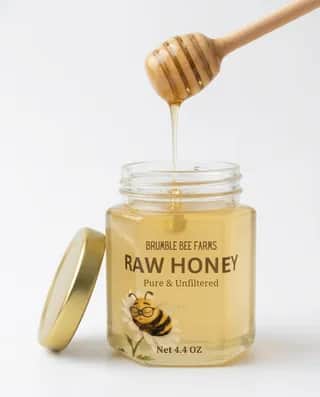
Lifestyle hero shot generated from a single phone snapshot, with the label text preserved exactly
Use Cases
AI product photography from phone photos, Shopify and WooCommerce product page hero images, Amazon and Etsy listing photos on clean white backgrounds, Lifestyle product scenes without a photoshoot, Packaging and label mockups that keep exact brand text, Flat-lay and in-hand product shots for social media, Vertical product videos for Instagram Reels and TikTok, Turntable and orbit product clips for launch pages, Ad creative in square vertical and widescreen sizes, Fixing the background lighting or props on a product photo
Dynamic MCP Setup
Connect once through AgentPMT Dynamic MCP, then use approved tools from the same agent connection.
30 Second Setup
STDIO connector for Claude Code, Codex, Cursor, Zed, and other LLMs that require STDIO or custom connections.
npm install -g @agentpmt/mcp-routeragentpmt-setupHosted Streamable HTTPS
MCP endpoint for browser-based apps like ChatGPT, Claude, Grok, or any time you want a streamable connection with no local install.
https://api.agentpmt.com/mcpConfig Example
Use the hosted endpoint directly in clients that support remote MCP. Store your Bearer token in the client config or secret field.
{
  "mcpServers": {
    "agentpmt": {
      "type": "streamable-http",
      "url": "https://api.agentpmt.com/mcp",
      "headers": {
        "Authorization": "Bearer <AGENTPMT_BEARER_TOKEN>",
        "x-instance-metadata": "{\"client\":\"generic-mcp\",\"platform\":\"remote\"}"
      }
    }
  }
}
Need client videos, organization controls, audit details, and the full feature overview?
More About Dynamic MCPAbout this Product
Describe the photo you want. Get one you can sell with.
Start with the photos you already have, even a quick phone snapshot on a messy kitchen counter. Tell your agent the scene you're after and it produces a finished product picture. No studio, no photographer, no editing software, and no settings to learn.
Things you can just ask for
- "Put my candle on a sunlit marble counter with a linen napkin."
- "Plain white background, nothing else in frame, for my Amazon listing."
- "Make it vertical so I can use it for Reels."
- "Show it held in someone's hand so people can tell how big it is."
- "Lay the whole set out from above for the shop banner."
- "Same photo, but warmer light and a softer shadow."
The right look for where it's going
Ask for a premium hero shot for your homepage, a styled lifestyle scene, a clean marketplace photo for Shopify, Amazon, or Etsy, a packaging or label mockup, an overhead flat lay, or an in-hand shot that shows scale. Ask for it square for a listing, tall for Reels and TikTok, or wide for a banner, and you get it sized correctly.
Your label stays your label
Most AI image tools scramble the words on your packaging. Here you can say exactly what's printed on the label, which colors are yours, what must not change, and what should never appear in the shot. Those details carry through to the finished picture. Generated images still deserve a quick look before you publish, so check the small print on the label the way you'd check a proof.
Don't like something? Just say so.
Ask for the one thing you want changed and the rest stays put: the product, the angle, the composition. "Lose the eucalyptus." "Make the background paler." "Warmer light." "Turn this into a tall version for Instagram." It's a conversation, not a re-shoot.
Turn a photo into a short video
Any picture you approve can become a short product clip, four to eight seconds, with a slow zoom in, a turntable spin, a gentle orbit, a sweep of light, or a floating product. Upright for Reels, TikTok, and Shorts, or widescreen for your product page, in HD or 4K, silent or with sound. Perfect for a launch post when you don't have video of the product.
What your agent takes care of
- Picking the right size and format for where the image or video is going.
- Keeping your product looking like the same product across every shot.
- Framing a picture correctly for video so your clip fills the screen, with no black bars.
- Running revisions and comparing options when a shot isn't right yet.
- Saving every finished image and video so you can download it or hand it straight to your store, your ad account, or the next step in a workflow.
What it costs
About 25 cents for each picture you create or revise, and about 10 cents to turn one into a video. Image and video generation runs on your own ElevenLabs account, so you'll connect an ElevenLabs key once before your first render, and that usage is billed there.
Who it's for
Makers and small brands listing on Etsy, Shopify, and Amazon; DTC and e-commerce teams that need fresh creative weekly; marketers and agencies producing ad variations; and AI agents that need product visuals on demand.
Runs on ElevenLabs Image & Video, with Google Veo 3.1 behind the motion and Nano Banana (Google Gemini) available as a second image engine when you want to compare two looks.
Frequently Asked Questions
How do I connect this tool to an external agent?
You can install the local MCP server by opening a terminal and running:
Install commands
npm install -g @agentpmt/mcp-router
agentpmt-setup
This will connect you to local agents like Claude Code, Windsurf, Grok Build, Cursor, etc.
Alternatively you can connect to the hosted version with this config block, no installation required:
Hosted MCP config
{
  "mcpServers": {
    "agentpmt": {
      "type": "streamable-http",
      "url": "https://api.agentpmt.com/mcp",
      "headers": {
        "Authorization": "Bearer <AGENTPMT_BEARER_TOKEN>",
        "x-instance-metadata": "{\"client\":\"generic-mcp\",\"platform\":\"remote\"}"
      }
    }
  }
}
View MCP Connection Instructions for more details.
How does an external agent use this tool?
After the external agent is connected to an Agent Group that can use this tool, paste this prompt into the agent:
Agent prompt
Use the AgentPMT-Tool-Search-and-Execution tool. First call action 'get_instructions' so you know how to use the tool search interface. Then call action 'get_schema' with tool_id 6aa82f8ef9dfb4fd6eb0d99a ("Product Mockup Studio"). After reading the schema and any returned instructions, tell me what this tool can do, we are going to be using it
The agent should fetch the tool schema first, collect the required parameters for your request, and then call the tool through AgentPMT.
Can it make product videos for TikTok and Instagram Reels?
Yes. Any picture you approve can become a short clip of four to eight seconds: a slow zoom in, a turntable spin, a gentle orbit, a sweep of light, or a floating product. Upright for Reels, TikTok, and Shorts, or widescreen for your product page, silent or with sound. Handy for a launch post when you have no video of the product.
How much does it cost?
About 25 cents for each picture you create or revise, and about 10 cents to turn a picture into a short video. Image and video generation runs on your own ElevenLabs account, so that usage is billed there.
What do I need to get started?
A few photos of your product. Phone photos are fine, and a cluttered background is fine too. You also connect an ElevenLabs account once before your first picture. After that you just describe the shot you want, and your agent handles the files, sizes, and formats.
What if I don't like the picture I get back?
Say what is wrong and your agent changes only that: paler background, softer shadow, lose the prop, warmer light, a different angle. Your product stays the same between versions, so you are refining one photo rather than starting over. You can also ask for a second take in a different style and pick the one you prefer.
What sizes can I get, and will they fit my store?
Say where the picture is going and your agent sizes it for you: square for a shop listing, tall for Reels, TikTok, and Stories, or wide for a homepage banner or an ad. You can ask for the same product in several sizes at once. Videos come out in HD or 4K.
Where do my pictures and videos go?
Every finished picture and video is saved for you and kept for seven days. Download the ones you want to keep, or have your agent hand them straight to your store, your ad account, or the next step in a workflow.
Will the words on my label come out right?
Tell your agent exactly what is printed on your packaging, which colors are yours, and which details must not change. Those are held in place while the scene around the product changes. These are still generated images, so give the finished picture a quick look before you publish, the way you would check a print proof. If a detail is wrong, ask for that one fix and the rest stays as it is.