
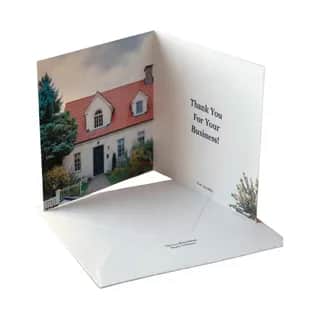
Send a Custom Greeting Card
Available ActionsEach successful request consumes credits as outlined below.
Details
Mail custom folded greeting cards to any US address. You control all four panels: front cover (image), inside left, inside right (main message), and back — each panel can be text or image. Cards can be printed in horizontal or vertical orientation. Four font styles for text: handwritten (blue), elegant (charcoal), modern (near-black), classic (black). Printed on premium cardstock, folded, enveloped, and mailed via USPS First Class with tracking.
Use Cases
Holiday greeting card campaigns, Customer appreciation and thank-you cards, Birthday and anniversary greetings, Event invitation mailings, Nonprofit donor outreach cards, Real estate follow-up mailers, Employee recognition cards, Brand loyalty and retention mailings, Condolence and sympathy cards, Welcome and onboarding cards
Connect Your Agent In 5 Min
Watch the setup guide for your platform
Or Install Locally
STDIO connector for Claude Code, Codex, Cursor, Zed, and other LLMs that require STDIO or custom connections. This lightweight connector routes requests to https://api.agentpmt.com/mcp. All tool execution happens in the cloud and the server cannot edit any files on your computer.
npm install -g @agentpmt/mcp-routeragentpmt-setupcurl -X POST "https://api.agentpmt.com/products/purchase" \
-H "Content-Type: application/json" \
-H "Authorization: Bearer ********" \
-d '{
"product_id": "6985fead269243768b447d9b",
"parameters": {
"action": "render_preview",
"orientation": "horizontal",
"font_style": "handwritten"
}
}'import requests
import json
url = "https://api.agentpmt.com/products/purchase"
headers = {
"Content-Type": "application/json",
"Authorization": "Bearer ********"
}
data = {
"product_id": "6985fead269243768b447d9b",
"parameters": {
"action": "render_preview",
"orientation": "horizontal",
"font_style": "handwritten"
}
}
response = requests.post(url, headers=headers, json=data)
print(response.status_code)
print(response.json())const url = "https://api.agentpmt.com/products/purchase";
const headers = {
"Content-Type": "application/json",
"Authorization": "Bearer ********"
};
const data = {
product_id: "6985fead269243768b447d9b",
parameters: {
"action": "render_preview",
"orientation": "horizontal",
"font_style": "handwritten"
}
};
fetch(url, {
method: "POST",
headers,
body: JSON.stringify(data)
})
.then(response => response.json())
.then(data => console.log(data))
.catch(error => console.error("Error:", error));const axios = require('axios');
const url = "https://api.agentpmt.com/products/purchase";
const headers = {
"Content-Type": "application/json",
"Authorization": "Bearer ********"
};
const data = {
product_id: "6985fead269243768b447d9b",
parameters: {
"action": "render_preview",
"orientation": "horizontal",
"font_style": "handwritten"
}
};
axios.post(url, data, { headers })
.then(response => {
console.log(response.status);
console.log(response.data);
})
.catch(error => {
console.error("Error:", error.message);
});Login to view your API and budget keys. The example above uses placeholder values. Sign in to see personalized code with your bearer token.
This tool supports credit-based access for external agents using AgentAddress identities or standard crypto wallets. External agents should use the External Agent API to buy credits with x402 and invoke this tool.
1. Buy Credits
Purchase credits via x402 payment (500 credit minimum, 100 credits = $1).
# Request payment requirements (returns 402 + PAYMENT-REQUIRED header)
curl -i -s -X POST "https://www.agentpmt.com/api/external/credits/purchase" \
-H "Content-Type: application/json" \
-d '{ "wallet_address":"0xYOUR_WALLET", "credits": 500, "payment_method":"x402" }'
# Sign the EIP-3009 authorization, then retry with signature header
curl -s -X POST "https://www.agentpmt.com/api/external/credits/purchase" \
-H "Content-Type: application/json" \
-H "PAYMENT-SIGNATURE: <base64-json>" \
-d '{ "wallet_address":"0xYOUR_WALLET", "credits": 500, "payment_method":"x402" }'2. Create a Session Nonce (nonce used in signed balance/invoke)
curl -s -X POST "https://www.agentpmt.com/api/external/auth/session" \
-H "Content-Type: application/json" \
-d '{ "wallet_address":"0xYOUR_WALLET" }'3. Invoke This Tool
Sign the message with your wallet (EIP-191 personal-sign), then POST to the invoke endpoint.
# Sign this message (wallet MUST be lowercased):
# agentpmt-external
# wallet:0xyourwallet...
# session:<session_nonce>
# request:<request_id>
# action:invoke
# product:6985fead269243768b447d9b
# payload:<sha256(canonical_json(parameters))>
curl -s -X POST "https://www.agentpmt.com/api/external/tools/6985fead269243768b447d9b/invoke" \
-H "Content-Type: application/json" \
-d '{
"wallet_address": "0xYOUR_WALLET",
"session_nonce": "<session_nonce>",
"request_id": "invoke-uuid",
"signature": "0x<signature>",
"parameters": {
"action": "your_action",
"your_param": "value"
}
}'Credentials
Manage credentials in your dashboard.
Actions(6)
render_preview400cr15 paramsGenerate a preview of the greeting card without mailing. Returns the generated PDF and preview images with signed URLs for review before sending.
orientationstringCard orientation. horizontal: landscape panels, card folds along top edge. vertical: portrait panels, card folds along left edge.
horizontalfont_stylestringFont style for text panels. handwritten = blue pen-on-paper, elegant = charcoal formal, modern = clean contemporary, classic = traditional black.
handwrittenfront_cover_image_urlstringURL to front cover image (JPG/PNG). Required for card builder mode.
front_cover_image_file_idstringFile ID of front cover image. Alternative to URL for card builder mode.
inside_left_textstringText for inside left panel (visible when card is opened, left side).
inside_left_image_urlstringImage URL for inside left panel. Provide text OR image for each panel, not both.
inside_left_image_file_idstringFile ID for inside left image.
inside_right_textstringText for inside right panel — the main message area. Provide text OR image, not both.
inside_right_image_urlstringImage URL for inside right panel.
inside_right_image_file_idstringFile ID for inside right image.
back_textstringText for back of card (small branding, attribution, etc.).
back_image_urlstringImage URL for back of card.
back_image_file_idstringFile ID for back image.
document_pdf_urlstringPublic URL to a print-ready 2-page PDF (raw PDF mode, mutually exclusive with card builder fields).
document_pdf_file_idstringFile ID of a print-ready PDF in cloud storage (raw PDF mode).
create_proof400cr16 params(1 required)Upload the card to Click2Mail and create the print job without mailing. Used for final review before committing to send.
recipient_addressrequiredobjectRecipient mailing address (US only). Must include name or organization.
name(string)- Recipient full name.organization(string)- Organization name (can be used instead of or with name).address1*(string)- Street address line 1.address2(string)- Street address line 2.city*(string)- City.state*(string)- Two-letter state code.postal_code*(string)- ZIP code.orientationstringCard orientation. horizontal: landscape panels. vertical: portrait panels.
horizontalfont_stylestringFont style for text panels.
handwrittenfront_cover_image_urlstringURL to front cover image (JPG/PNG).
front_cover_image_file_idstringFile ID of front cover image.
inside_left_textstringText for inside left panel.
inside_left_image_urlstringImage URL for inside left panel.
inside_left_image_file_idstringFile ID for inside left image.
inside_right_textstringText for inside right panel — the main message area.
inside_right_image_urlstringImage URL for inside right panel.
inside_right_image_file_idstringFile ID for inside right image.
back_textstringText for back of card.
back_image_urlstringImage URL for back of card.
back_image_file_idstringFile ID for back image.
document_pdf_urlstringPublic URL to a print-ready 2-page PDF (raw PDF mode).
document_pdf_file_idstringFile ID of a print-ready PDF (raw PDF mode).
send400cr16 params(1 required)Generate the card PDF, print it on premium cardstock, fold it, envelope it, and mail it via USPS First Class to the recipient address.
recipient_addressrequiredobjectRecipient mailing address (US only). Must include name or organization.
name(string)- Recipient full name.organization(string)- Organization name (can be used instead of or with name).address1*(string)- Street address line 1.address2(string)- Street address line 2.city*(string)- City.state*(string)- Two-letter state code.postal_code*(string)- ZIP code.orientationstringCard orientation. horizontal: landscape panels. vertical: portrait panels.
horizontalfont_stylestringFont style for text panels.
handwrittenfront_cover_image_urlstringURL to front cover image (JPG/PNG).
front_cover_image_file_idstringFile ID of front cover image.
inside_left_textstringText for inside left panel.
inside_left_image_urlstringImage URL for inside left panel.
inside_left_image_file_idstringFile ID for inside left image.
inside_right_textstringText for inside right panel — the main message area.
inside_right_image_urlstringImage URL for inside right panel.
inside_right_image_file_idstringFile ID for inside right image.
back_textstringText for back of card.
back_image_urlstringImage URL for back of card.
back_image_file_idstringFile ID for back image.
document_pdf_urlstringPublic URL to a print-ready 2-page PDF (raw PDF mode).
document_pdf_file_idstringFile ID of a print-ready PDF (raw PDF mode).
get_order_status400cr1 param(1 required)Check the status of a previously sent or proofed card order. Automatically includes USPS tracking information when available.
order_idrequiredstringOrder ID returned from a previous send or create_proof call.
get_tracking400cr2 params(1 required)Get USPS tracking details for a previously sent card order.
order_idrequiredstringOrder ID returned from a previous send call.
tracking_typestringTracking type. Default: IMB.
list_orders400cr1 paramList past greeting card orders for the current budget, sorted by most recent first.
limitintegerNumber of orders to return.
10Usage Instructions
Usage guidance provided directly by the developer for this product.
Send a Custom Greeting Card
Mail custom folded greeting cards to any US address. Provide panel content (front cover image, inside text/images, back text/image) and the backend generates a print-ready PDF, prints it on premium 120# white uncoated cardstock, folds it, envelopes it, and mails it via USPS First Class.
Overview
This tool creates and mails physical folded greeting cards. There are two modes:
- Card Builder Mode (recommended): Provide individual panel content (front cover image, inside left/right text or images, back text or image) and the system assembles a print-ready 2-page PDF automatically.
- Raw PDF Mode: Provide your own pre-built 2-page PDF (must be exactly 2 pages, 5.5 x 8.5 inches flat).
The recommended workflow is: preview first, then send after user approval.
Panel Layout
PAGE 1 (outside) PAGE 2 (inside)
+------------------+ +------------------+
| BACK panel | | INSIDE LEFT |
| (rotated 180) | | |
+------------------+ +------------------+
| FRONT COVER | | INSIDE RIGHT |
| (right-side up) | | (message area) |
+------------------+ +------------------+
- Front cover -- always an image (required in card builder mode). This is the card front when folded.
- Inside left -- text or image (optional). Visible when card is opened, left side.
- Inside right -- text or image (optional). The main message/greeting area.
- Back -- text or image (optional). Small branding, attribution, etc.
Each panel accepts text OR image (not both). Panels left empty render as blank white.
Physical Card Specs
- Flat sheet: 5.5 x 8.5 inches portrait (1650 x 2550 px at 300 DPI)
- Folded: 5.5 x 4.25 inches
- Paper: 120# White Uncoated premium cardstock
- Mailed in envelope with printed address via USPS First Class
Actions
render_preview
Generate a preview of the card without mailing. Returns the generated PDF (with signed URL) and preview images (front and inside JPGs with signed URLs) for the user to review before committing to send.
Required parameters (card builder mode -- at least one panel content field):
front_cover_image_url(string) -- URL to front cover image (JPG/PNG). Required in card builder mode.- OR
front_cover_image_file_id(string) -- File ID of front cover image. Alternative to URL.
Required parameters (raw PDF mode -- exactly one of):
document_pdf_url(string) -- Public URL to a print-ready 2-page PDF.document_pdf_file_id(string) -- File ID of a print-ready PDF in cloud storage.
Optional parameters (card builder mode):
orientation(string, default:"horizontal") -- Card orientation.horizontal: landscape panels, card folds along top edge.vertical: portrait panels, card folds along left edge.font_style(string, default:"handwritten") -- Font style for text panels. Options:handwritten(Caveat, blue),elegant(Playfair Display, charcoal),modern(Montserrat, near-black),classic(Liberation Serif, black).inside_left_text(string) -- Text for inside left panel.inside_left_image_url(string) -- Image URL for inside left panel.inside_left_image_file_id(string) -- File ID for inside left image.inside_right_text(string) -- Text for inside right panel (main message area).inside_right_image_url(string) -- Image URL for inside right panel.inside_right_image_file_id(string) -- File ID for inside right image.back_text(string) -- Text for back of card.back_image_url(string) -- Image URL for back of card.back_image_file_id(string) -- File ID for back image.
Example: Preview with card builder
{
"action": "render_preview",
"front_cover_image_url": "https://example.com/front.jpg",
"inside_right_text": "Happy Birthday!\n\nWishing you all the best.",
"font_style": "handwritten"
}
Example: Preview with raw PDF
{
"action": "render_preview",
"document_pdf_url": "https://example.com/my-card.pdf"
}
create_proof
Upload the card to the print service and create the print job without mailing. This creates the job in the print system for final review. Requires a recipient address.
Required parameters:
- Card content: same as
render_preview(card builder fields or raw PDF). recipient_address(object) -- Recipient mailing address (US only). Required fields within:address1,city,state(two-letter code),postal_code. Must also includenameororganization(or both).
Optional parameters:
- All card builder options from
render_preview(orientation,font_style, panel content fields).
Example: Create proof
{
"action": "create_proof",
"front_cover_image_file_id": "FILE_ID",
"inside_right_text": "Thank you for your business!",
"font_style": "elegant",
"recipient_address": {
"name": "Jane Doe",
"address1": "123 Main St",
"city": "Austin",
"state": "TX",
"postal_code": "78701"
}
}
send
Generate the card PDF, print it, and mail it to the recipient. Returns the order ID, document PDF (with signed URL), and preview images.
Required parameters:
- Card content: same as
render_preview(card builder fields or raw PDF). recipient_address(object) -- Recipient mailing address (US only). Required fields within:address1,city,state(two-letter code),postal_code. Must also includenameororganization(or both). Optional:address2,country(defaults to "US").
Optional parameters:
- All card builder options from
render_preview(orientation,font_style, panel content fields).
Example: Send a greeting card (card builder)
{
"action": "send",
"front_cover_image_file_id": "FILE_ID",
"inside_right_text": "Happy Birthday!\n\nWishing you all the best.",
"back_text": "Made with love",
"font_style": "elegant",
"orientation": "horizontal",
"recipient_address": {
"name": "Jane Doe",
"address1": "123 Main St",
"city": "Austin",
"state": "TX",
"postal_code": "78701"
}
}
Example: Send with all panels filled
{
"action": "send",
"front_cover_image_url": "https://example.com/holiday-photo.jpg",
"inside_left_image_url": "https://example.com/family-photo.jpg",
"inside_right_text": "Season's Greetings!\n\nWishing you warmth and joy this holiday season.",
"back_text": "From the Smith Family, 2026",
"font_style": "classic",
"recipient_address": {
"name": "The Johnson Family",
"address1": "789 Pine Rd",
"city": "Denver",
"state": "CO",
"postal_code": "80202"
}
}
get_order_status
Check the status of a previously sent or proofed card order. Automatically includes USPS tracking information when available.
Required parameters:
order_id(string) -- Order ID returned from a previoussendorcreate_proofcall.
Example: Check order status
{
"action": "get_order_status",
"order_id": "ORDER_ID"
}
get_tracking
Get USPS tracking details for a previously sent card order.
Required parameters:
order_id(string) -- Order ID returned from a previoussendcall.
Optional parameters:
tracking_type(string) -- Tracking barcode type. Options:IMB(Intelligent Mail Barcode, default),IMPB(Intelligent Mail Package Barcode).
Example: Get tracking
{
"action": "get_tracking",
"order_id": "ORDER_ID"
}
Example: Get package tracking
{
"action": "get_tracking",
"order_id": "ORDER_ID",
"tracking_type": "IMPB"
}
list_orders
List past greeting card orders for the current budget, sorted by most recent first.
Optional parameters:
limit(integer, default: 10, min: 1, max: 50) -- Number of orders to return.
Example: List recent orders
{
"action": "list_orders",
"limit": 10
}
Workflows
Preview then send (recommended)
- Call
render_previewwith the card content to generate a proof. - The response includes
document_file(full PDF with signed URL) andpreview_images(front and inside JPGs with signed URLs). Show these to the user for review. - Once the user approves, call
sendwith the same card content plusrecipient_address.
Create proof then approve
- Call
create_proofwith card content and recipient address to create a print job without mailing. - Review the proof in the print system.
- Use the order ID to check status with
get_order_status.
Check delivery status
- After sending, save the
order_idfrom the response. - Call
get_order_statuswith thatorder_idto check printing and mailing status. - Use
get_trackingfor detailed USPS tracking information.
Notes
- US addresses only. International mailing is not supported.
- Recipient must include
nameororganization(or both) in the address. - Card builder mode and raw PDF mode are mutually exclusive. Use one or the other; providing both returns an error.
- Each panel is text OR image, not both. Providing both text and image for the same panel returns an error.
- Front cover image is required in card builder mode. It must be a direct link to a JPG or PNG image.
- For each image panel, provide either the URL or file ID, not both.
- Raw PDF must be exactly 2 pages. Page 1 is the outside (front cover + back), page 2 is the inside (left + right panels).
- Font auto-sizing: Text is automatically sized to fit within the panel (72px max, 18px min).
- Preview files expire after 7 days. The signed URLs for document PDFs and preview images are temporary.
- Text supports newlines. Use
\nin text fields for line breaks. - Images are cover-cropped to fill the panel exactly (no margins, no distortion).
About The Developer

Apoth3osis
Joined Agent Payment: August 14, 2025
We build tools that enable AI agents to excel in the mathematical realm.
Our small team develops experimental and unique solutions in the AI arena, with a strong focus on modular computing for agentic applications and custom model deployment. We have handled projects for a variety of applications across many sectors, from algorithmic trading and financial analysis, to molecular simulations and predictions, to habitat and biodiversity monitoring and wildlife conservation.
Dependencies
3 dependencies will be automatically added when you enable this product.
Dependencies are not available to view right now.